

3 Ways To Use Padlet In Your Elementary Classroom
How Padlet Helped My Elementary Classroom Run More Smoothly
One of my favorite educational technology tools is Padlet, a digital bulletin board that helped me organize classroom information, communicate with parents, and provide students with clear daily directions.
I didn't use Padlet because I wanted another piece of technology. I used it because it solved everyday classroom problems and made our routines more organized.
I used the free version for years before deciding whether I needed additional features.
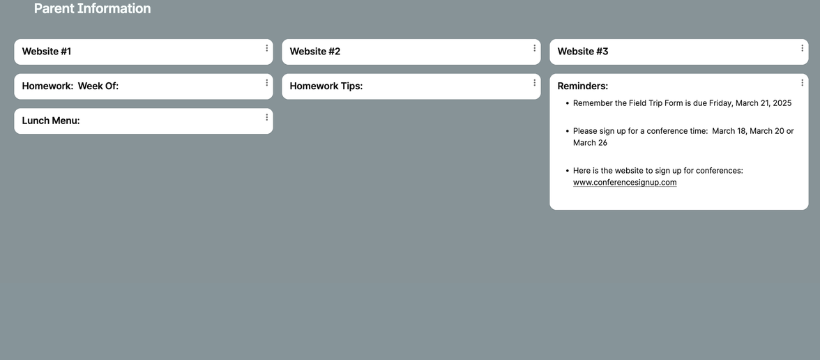
Padlet Idea #1: Parent Communication Board
The first board was the information board I used for parents. This included topics such as:
Websites Parents Can Use With Students At Home
Homework Assignments
Homework Help and Tips For Parents
Lunch Menu
Reminders Section
Parents could look at this site any time, which helped to answer questions when I was not available during school or after hours.
I kept this board up and updated it throughout the year.
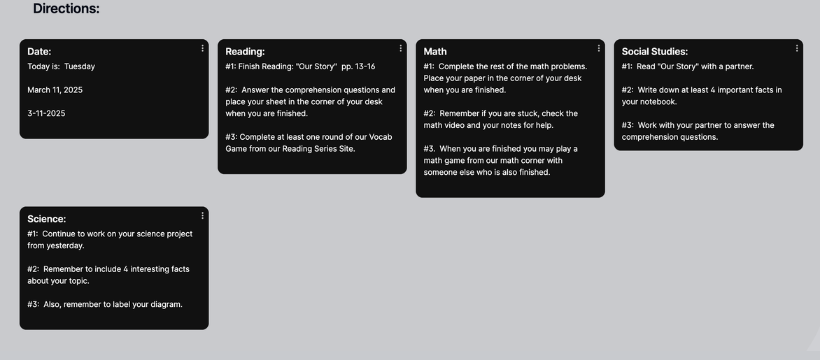
Padlet Idea #2: Daily Directions Board
On this board, I typed up the directions for each subject every day and then posted them up on the Whiteboard during work time.
Then, when students had questions about what they were required to do, they just looked up at the Whiteboard for a reference.
I often zoomed in on the current board of the day to make sure all students could see the directions clearly.
I kept this board throughout the year and updated it each day.
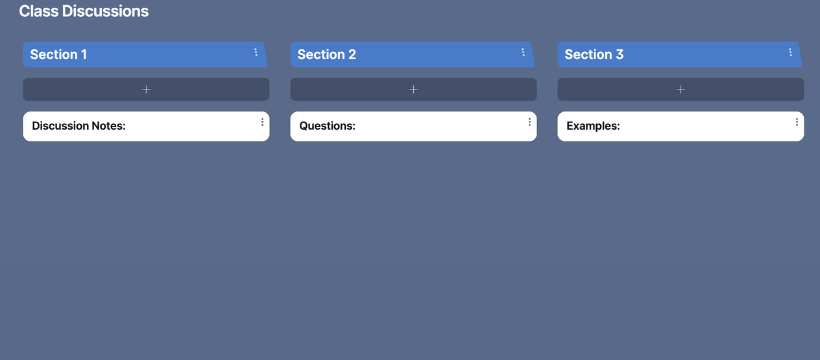
Padlet Idea #3: Classroom Discussion Board
On the Class Discussion Board I had three areas:
Discussion
Questions
Examples
I created this board so I could write notes and interact with the class as I was typing on my computer while I was facing the students.
Typing on the Class Discussion Padlet prevented issues before they happened, which saved time and the need to implement consequences for off-task behavior.
I updated this board each day.
Tip:
You can go to the share button at the top of the Class Discussion Padlet and Print or Export as a PDF each Class Discussion Note if you choose.
Then you can create a folder in Google and keep all your discussion notes in one place.
Padlet Tips To Get You Started:
Create your free account
Create your first board and name it.
Double click on the board to create your first post.
On each post you have the ability to:
Type on the post
Upload a PDF or Video
Take a picture or record a video from your computer screen
Share your link with parents to your Parent Information Board.
Tips:
Padlet includes your email in the link. The formula is padlet.com/youremail/numbers
Make sure you use an email you want parents to see.
On the Padlet Board under Settings-Advanced, you can change the last part of your URL. You could edit your link: padlet.com/youremail/parentinfo
Also, double-check your settings on your Parent Information Board to make sure nobody else is able to edit your board.
Go to: Settings - Posts - and scroll down to Content
Continue Building an Organized Classroom
If you're looking for more practical strategies to create an organized, efficient classroom, these articles are a great next step.
5 Parent Communication Tips for Elementary Teachers
Discover simple ways to strengthen home-school communication and build positive relationships with families throughout the year.
5 Simple Steps for Setting Up Your Classroom
Learn classroom organization strategies that help create smoother routines, stronger expectations, and a more efficient learning environment.
How I Created a Small Group Time That Works!
See how I combined classroom layout, routines, and organization to build a successful small group system with fewer interruptions.
Final Thoughts
Using Padlet for parent communication, daily directions, and classroom discussions helped my classroom stay organized while reducing interruptions throughout the day.
The best part is that students and parents always knew where to find the information they needed, even when I was working with a small group or helping another student.
If you're looking for a simple way to organize classroom communication, Padlet is definitely worth exploring.
Keep Building Your Classroom
I'm Getting Ready for Back-to-School
FREE Back-to-School Toolkit
Get organized before the first day with a Classroom Setup Checklist, Parent Communication Log, and 4-Step Classroom Routines Guide.
I Want My Classroom to Run More Smoothly
Free Classroom Layout Guide
Learn simple classroom setup strategies that support smoother routines, stronger classroom management, and more successful small groups.
I Want to Stay Organized All Year
Academic Planner & Organizer
Keep lesson plans, student data, parent communication, behavior notes, meetings, and small groups organized in one printable planner.
I Want Better Small Groups
Small Groups Blueprint
Learn my complete step-by-step system for planning, organizing, and running successful small groups with fewer interruptions.
I Need More Math Practice
Math Facts Board Games Bundle
Hands-on board games that make math fact practice engaging and build fluency through repeated play.
Math Facts Card Games Bundle
Easy-prep card games students enjoy while building addition, subtraction, multiplication, and division fluency.
I'm Looking for More Free Teaching Ideas
Visit the blog for classroom organization, classroom management, small groups, behavior strategies, educational technology, and free resources.